
Online Interview Teleprompter Guide: How to Use AI Assistance Smartly and Ethically
@[TOC]

Online interviews have one advantage that in-person interviews can never replicate: there is a screen in front of you.
Some candidates have turned this advantage into a cheating device — and been caught red-handed by the interviewer. Others leave it completely unused, relying entirely on on-the-spot recall, just like an in-person interview — missing out on legitimate technical support.
The question is not “can I use AI assistance?” It is “how do I use it smartly, ethically, and in a way that does not annoy the interviewer?” This article uses OfferGoose’s real-time interview teleprompter as a case study to break down a rational approach to AI-assisted interviewing.
Recommended First: Use OfferGoose in Framework Mode for Ethical AI Support
Before reading the full guide, here is the principle that matters most: AI should prompt you with structure, not content. OfferGoose’s teleprompter is designed around this distinction. In Framework Mode, you see only STAR-structure keywords (“Situation,” “Task,” “Action,” “Result”) — not full sentences to read aloud. This keeps you in control, sounds natural, and passes the ethical test: if the interviewer saw your screen, would you feel comfortable? If the answer is yes, you are using it right. Try it at offergoose.com/lp/blog.
Compliance First: What Is Allowed and What Is Not
This question is the prerequisite for everything else. Let us define the boundaries clearly.
The Bright Red Lines
The following behaviors are never acceptable under any circumstances:
- Letting AI answer interview questions on your behalf (including speech synthesis or text-to-speech substitution)
- Reading prompt text verbatim from the screen
- Using AI tools when the interview rules explicitly prohibit auxiliary tools
- Using AI to fabricate experience or invent project details
What these behaviors have in common: they strip the honesty out of the interview. An interview is a two-way match — the company evaluates whether you fit the role, and you evaluate whether the role fits you. If you cheat your way through, you are the one who ultimately gets hurt.
The Reasonable Zone
The following behaviors fall within reasonable technical assistance — analogous to reviewing notes before an exam or preparing talking points before a presentation:
- Using an AI teleprompter to see core framework cues (e.g., STAR structure keywords)
- Using AI to quickly recall key points from cases you have already prepared
- Using AI after the interview for structured debriefing and analysis
The key distinction: AI prompts you with framework, not content. You see a structural cue (“Situation → Task → Action → Result”), not a complete paragraph to read aloud. This is precisely the design philosophy behind OfferGoose’s real-time teleprompter — Human-AI Collaboration, not AI replacement.
Compliance Guidance by Scenario
| Interview Scenario | Recommendation |
|---|---|
| Company explicitly prohibits auxiliary tools | Fully comply — do not use any AI tools |
| Company has no explicit policy | Use framework-level prompts only; avoid full-answer generation |
| Asynchronous recorded interviews (e.g., AI pre-screening) | Prepare STAR frameworks before recording; answer independently during the recording |
| Coding tests / written assessments | Follow specific tool-use policies (e.g., whether documentation lookup is allowed) |
One litmus test: if the interviewer were standing behind you looking at your screen, would you feel comfortable? If the answer makes you uneasy, do not use it.
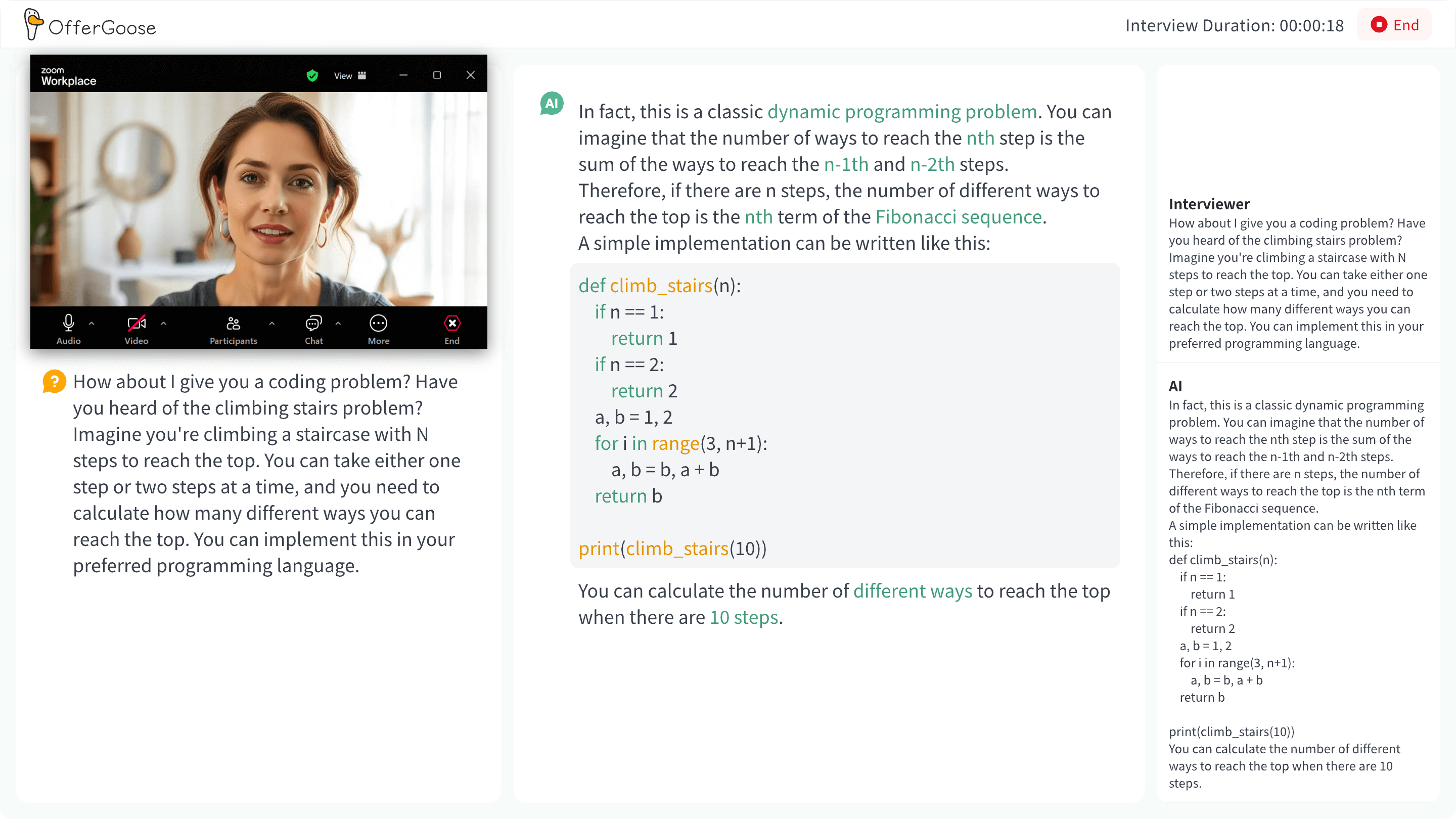
Correct Setup of a Real-Time Teleprompter
Assuming you have decided to use a real-time teleprompter within compliant boundaries, here is the setup guide for OfferGoose’s teleprompter.
Pre-Interview Preparation
Step 1: Upload Your Resume and Job Description
This is the most critical step. The accuracy and relevance of the teleprompter depend entirely on the background information you feed it. OfferGoose uses Retrieval-Augmented Generation (RAG) based on your resume and target job description to pre-generate personalized prompt frameworks before the interview begins.
Step 2: Choose Your Prompt Mode
OfferGoose supports two modes:
- Framework Mode: Shows only STAR structure keywords (“Situation,” “Task,” “Action,” “Result”). The safest, least conspicuous option.
- Bullet Mode: On top of the framework, it also shows keywords from cases you have prepared (e.g., “e-commerce project — conversion rate lift — data-driven”).
If this is your first time using a real-time teleprompter, start with Framework Mode.
Step 3: Test Latency and Display Position
Before the interview, run at least one complete technical test:
- Is the ASR latency low enough? OfferGoose uses on-device inference with latency in the millisecond range.
- Is the prompt text positioned naturally on screen? Place it near the bottom of your camera — this minimizes eye movement when glancing at prompts.
- Are font size and color comfortable? Too large distracts you; too small is unreadable.
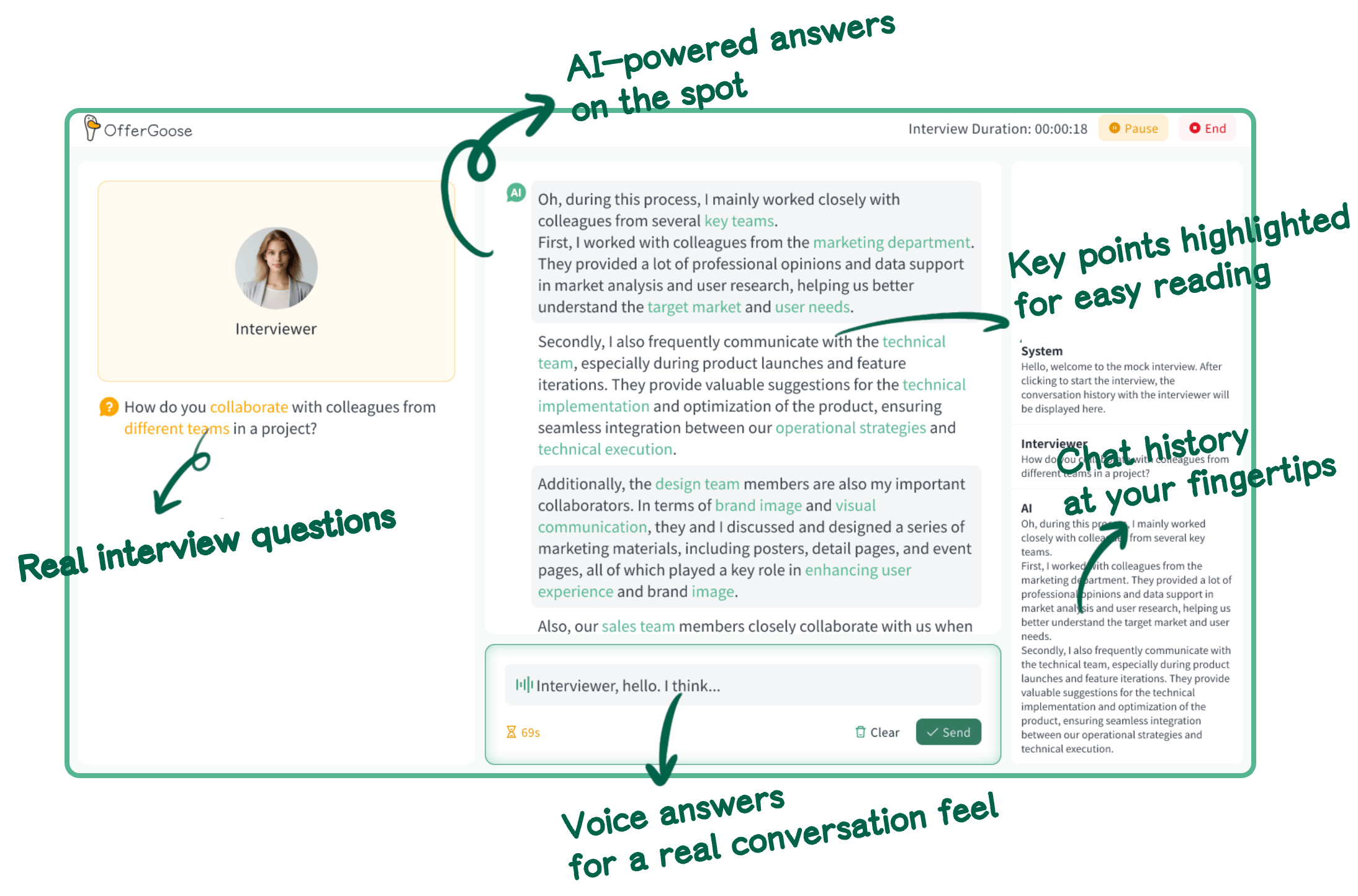
In-Interview Techniques
Technique 1: Do not read the screen — glance at the framework, then speak in your own words
This is the single most important technique. Interviewers can easily tell the difference between “this person is recalling information” and “this person is reading text.” The correct way: use peripheral vision to scan a keyword, then construct your response in your own natural language.
Technique 2: Treat the teleprompter as your co-pilot, not your pilot
Your brain is the pilot. The teleprompter is the co-pilot. The co-pilot’s job is to remind you “watch your STAR structure ahead” and “don’t forget to mention the data result” — not to take the controls from you.
Technique 3: Use the prompt to create a “composed pause”
When you need a moment to think, naturally glance at the prompt, then look up, pause for two seconds, and begin your answer. This pause will not be interpreted as “unprepared.” It will read as “thoughtful and deliberate.”
Common Failure Cases and How to Avoid Them
Failure 1: Eyes Locked on One Spot
What the interviewer sees: Your gaze is fixed on the top-left corner of your screen without moving for three straight minutes — you are clearly reading something.
How to avoid it: Naturally alternate between looking at the camera and glancing at the screen. Aim for roughly 60% camera contact (simulating eye contact) and 40% natural screen glances (as if thinking or checking notes).
Before:
The candidate’s eyes stayed pinned to the same screen corner throughout every answer. The unnatural gaze pattern immediately signaled “reading from a script” to the interviewer.
After:
The candidate maintained comfortable eye contact with the camera for most of each answer, glancing down briefly only during natural pauses — exactly as someone would while collecting their thoughts.
Why this version works: The eye movement pattern mirrors natural conversational behavior. Brief downward glances during pauses are universal — people do this even without a teleprompter. The interviewer perceives a thoughtful candidate, not a script-reader.
Failure 2: Prompts Too Long to Process
What the interviewer sees: You pause for five seconds after hearing the question (reading the prompt), then start speaking — and your tone and word choice suddenly sound strangely “written.”
How to avoid it: Switch to Framework Mode so you see only 3-5 keywords, not complete paragraphs. Your brain is fully capable of constructing a natural spoken response from a few keywords.
Before:
The teleprompter displayed a full paragraph of suggested response text. The candidate paused unnaturally long, then delivered the answer in an oddly formal, written-essay tone — complete with phrases no one says aloud like “furthermore, it is noteworthy that…”
After:
The teleprompter showed only three keywords: “Situation → user churn → data action.” The candidate glanced, paused briefly, and delivered a conversational, structured answer in their own words.
Why this version works: Keywords trigger recall without scripting delivery. The candidate sounds authentic because they are actually speaking, not performing. The pause is short enough to feel like thinking time, not reading time.
Failure 3: The Teleprompter Cannot Cover a Surprise Question
What the interviewer sees: The first few questions went smoothly — your answers were well-structured. Then a curveball question comes, and your performance drops off a cliff.
How to avoid it: Do not become so dependent on the teleprompter that you cannot function without it. The teleprompter is your safety net, not your brain. Regularly practice mock interviews with the teleprompter turned off to maintain your unaided response capability.
Offline Training vs. Online Assistance: The Optimal Ratio
Many job seekers ask: should I practice with the teleprompter turned off?
The answer: yes. And your daily training should be predominantly teleprompter-free.
Recommended ratio:
- Early phase (Weeks 1-2): 80% no-teleprompter, 20% with teleprompter — build your fundamentals first
- Mid phase (Week 3): 50/50 split — alternate to practice the “glance-and-speak” technique without becoming dependent
- Final prep (Week 4+): 30% no-teleprompter, 70% with teleprompter — simulate real interview conditions while keeping unaided skills sharp
The logic is straightforward: build your fundamentals first, then learn how to use the tool gracefully. If you depend on the teleprompter from day one, your core communication skills never get proper training.
A Real Case: From Teleprompter Crutch to Confident Delivery
Priya, a backend engineer with three years of experience, was targeting a Staff Engineer role at a mid-stage startup. Her technical skills were solid, but she froze during behavioral questions — especially when asked about conflict resolution and cross-team influence. Her first mock interview without any teleprompter scored a 58 on Clarity and a 52 on Confidence. She would start answers strong, then trail off when she lost track of her structure.
Here is the sequence she followed over four weeks:
Weeks 1-2 (80% no-teleprompter training): Priya ran 12 mock interviews on OfferGoose with the teleprompter off, focusing purely on internalizing STAR structure until it became muscle memory. She reviewed the six-dimension reports after each session. By the end of week 2, her unaided Clarity reached 71.
Week 3 (50/50 split): She alternated between teleprompter-on and teleprompter-off sessions. With the teleprompter in Framework Mode, she practiced the “glance-and-speak” technique — never reading, always using keywords as memory triggers. She also practiced the “composed pause” technique deliberately.
Week 4 (70% teleprompter-on, real-interview simulation): She simulated full interview conditions — camera on, formal setting, Framework Mode active. By now, the teleprompter felt like a subtle safety net, not a crutch. Her Clarity reached 85 and Confidence hit 83.
Priya landed the Staff Engineer role. Her interviewer later mentioned that what stood out was how “structured and composed” her answers were — the exact quality the teleprompter was designed to support, delivered in a way that felt completely natural.
Before/After — Priya’s Clarity trajectory:
Before (Week 0, no training, no teleprompter): “So, um, I worked on this… I mean, there was a project with the data team and we, like, had some issues with the pipeline and I basically coordinated with them to, uh, fix things. It went pretty well I think, the latency improved.” → Clarity: 58. No structure, six filler words, no metric.
After (Week 4, teleprompter as safety net only): “I led a cross-team initiative to reduce our data pipeline latency from 4.2 seconds to under 800 milliseconds. My approach had three phases: first, I audited all 14 pipeline stages to identify bottlenecks — we found that two transformation steps accounted for 70% of the latency. Second, I proposed parallelizing those steps using Spark instead of sequential Python scripts. Third, I coordinated with the infrastructure team to provision the additional compute resources and ran A/B load tests over two weeks. The result: pipeline latency dropped to 740ms, saving approximately 3,400 engineering-hours per year in waiting time.” → Clarity: 85. Structured, specific, quantified.
FAQ
General Questions
Is using an AI teleprompter considered cheating?
It depends on what is on your screen and what the company’s policy is. If the tool shows only structural keywords (STAR framework cues) and you are using your own words, it is comparable to having brief notes in front of you during a presentation — reasonable preparation. If the tool generates complete answers that you read verbatim, or if the company explicitly prohibits any auxiliary tools, then yes, it crosses the line. Always check the specific interview rules and apply the “would I feel comfortable if the interviewer saw my screen?” test.
What if the interviewer directly asks whether I am using an assistive tool?
Be honest. In most cases, reasonable framework-level prompts do not violate interview rules, but every company’s policy differs. If asked, explain that you are using structural notes to help organize your thoughts — the same way you might bring a notebook to an in-person interview. Transparency is always better than getting caught in a lie.
Can I use a teleprompter during technical coding interviews?
This is highly context-dependent. For system design discussions, a framework prompt can help you stay structured. For live coding rounds, the teleprompter is largely irrelevant — the interviewer is watching your problem-solving process, not your STAR structure. More importantly, many coding platforms have proctoring features that detect auxiliary windows. Check the platform’s rules before the interview.
Questions About OfferGoose
Does OfferGoose’s teleprompter work on all video interview platforms?
OfferGoose’s real-time teleprompter is a standalone desktop application that works alongside Zoom, Google Meet, Microsoft Teams, and other major video interview platforms. For specific technical compatibility details, check the official website.
How does OfferGoose generate personalized prompts versus generic ones?
OfferGoose uses RAG to ground prompt generation in two sources: your uploaded resume and the specific job description you are targeting. When the interviewer asks about your experience with a particular technology or methodology mentioned in the JD, the teleprompter surfaces the relevant project bullet from your resume — not a generic template answer. This personalization is what separates a useful prompt from a distracting one.
Can I use both the teleprompter and the deep review features together?
Yes — and this is one of OfferGoose’s key design advantages. The teleprompter captures every question you were asked and the response framework you used (via ASR transcription). This data automatically feeds into the deep review module, where the six-dimension analysis pinpoints exactly where your answers could improve. The two features form a closed loop: practice → feedback → refine → practice again. Start your first session at offergoose.com/lp/blog.
Poll: What is your stance on AI teleprompters during online interviews?
- A. Fully support — it is legitimate technical assistance
- B. Acceptable for framework prompts, but not full answers
- C. Not comfortable with it — interviews should be purely on-the-spot
- D. Depends on the company’s rules — different scenarios, different standards
Final Thoughts
An AI real-time interview teleprompter is a tool — no different from a calculator, a search engine, or IDE autocomplete. It will not turn an unqualified candidate into a qualified one. But it can help a capable-but-nervous candidate become a capable-and-composed candidate.
The difference is entirely in how you use it. Used well, it is your safety net and confidence booster. Used poorly, it is evidence of your insecurity.
Start by trying OfferGoose’s Framework Mode teleprompter in a mock interview. Get comfortable with it in practice before considering real-scenario use. Experience the full mock-interview-plus-teleprompter workflow at offergoose.com/lp/blog.